IMPORTANT NOTES
ON PANORAMA PICTURES
In some cases, your local film processing lab may not be able
to handle the printing of panorama size pictures. For details, consult your local
photo shop or camera dealer. Also, before you have your film processed, ask your
local photo shop about possible options for processing panorama pictures. Note that
panorama pictures are more expensive and require a longer processing time than regular
size pictures. For easy identification, attach the appropriate supplied adhesive
label, "PANORAMA", "NORMAL PANORAMA MIXED" or "DEVELOP
ONLY" to the film cartridge when you bring the film to a photo shop for
processing. 1) If an entire roll consists of panorama size pictures, be sure to specify
panorama processing, explain that your film consists entirely of panorama pictures,
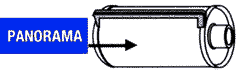
and attach a "PANORAMA" label on the film cartridge. 2) When you have a
mix of panorama and regular pictures on a single roll, you should have your film
processed according to one of the following conditions:
If your local photo shop has photo processing machinery equipped to process a
single roll of film Mat contains a mix of both panorama and regular size pictures.-
a) Explain that your film consists of a mix of panorama and regular size pictures when you have your film processed and attach a "NORMAL & PANORAMA MIXED" label to the film cartridge.
If your photo shop can only process either panorama or regular size pictures per roll:-
b) Ask for development only, so you can review the negative
film before printing, and later specify separate printing of panorama and regular
size frames. Attach a "DEVELOP ONLY" label to the film cartridge.
c) Print all of the pictures in regular size prints first, then later specify the
panorama size frames on the film and have them printed again in panorama size prints.
Note that when panorama pictures are printed as regular size pictures, the top and
bottom of each picture are blacked out.
 |
|
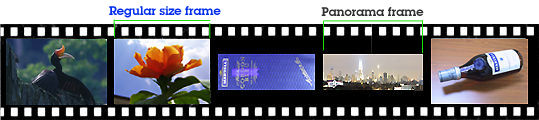
In a panorama picture, only the middle portion of each regular size film frame is exposed. There is no difference, however, in the number of pictures you can take with a roll, whether they be panorama, regular size, or a mix of both.
Featured section for BOTH Nikon 35Ti and 28Ti models
| Back | An overview on the Nikon 35Ti Quartz Date and Nikon 28Ti Quartz Date Compact Camera Models
| Message Board | Questions or issues ? Use here for discussion
Other helpful pages relating to these two
NIkon compact camera models:
Nomencluture / Main reference
Map for Nikon 35Ti Quartz
Date | Nikon 28Ti Quartz Date
Technical Specification for both models
Notes on Panorama pictures - applicable for both models
| Back |
Main Index Page
|
Back | to Pictorial History of Nikon SLR /
rangefinder / Nikonos / digital cameras.
The Rangefinder
|| The
Nikonos ||
Compact Cameras
SLRs -1959/1979 |
1980/1990 | 1991/1999 | y2k/2003 | 2004 ~
The
Eyes of Nikon:-
Rangefinder
RF-Nikkor
lenses:-
Main Index Page | Nikon Manual Focus Nikkor lenses:- Main Index Page
Nikon
Auto
Focus
Nikkor lenses:- Main Index Page

Nikon F
| Nikon F2 |
Nikon F3 |
Nikon F4 |
Nikon F5 |
Nikon F6 |
Nikkormat / Nikomat |
Nikon FM
| Nikon FE/ FA | Nikon EM/FG/FG20 | Nikon Digital SLRs | Nikon - Other models
MIR Supports for Photographic Community: Various Message Boards/Community
Forums
Nikon
F-series|
Nikon
F2-series|
Nikon
F3-series|
Nikon F4-series| Nikon
F5-series|Nikkormat/Nikomat-series
Nikon FM-series|Nikon
FE-series|Nikon
FA|Nikon
Digital
SLR
series|Various
Nikon
Models|Nikkor
Optic
-shared
Others:- Free Trade Zone - Photography| Free Trade Zone - Business Community |Free To Zouk - Photographic Community
Apple's Mac Public Community Message Board | Windows based PC &
Apple/Mac
Public Community Trade Exchange Centre
Home - Photography In Malaysia

About this photographic site...
Copyright
© 1998. leofoo ®. MIR Web Development Team.