|
Modern
Classic SLRs Series : |
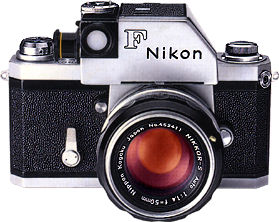
Nikon
F system was officially dis-continued in 1974, as with any used models,
users support may be of a concern. You may use this site for common
support and sharing mutual knowledge or experiences among yourself. I
hope this convenience provided can be of useful to all of you who still
owned this great piece of manual focus SLR. You may also make use this
message board as a guestbook for the camera. Enjoy.
This site is specifically created for this legendary system SLR camera from Nikon, its creator. Please don't mail me other than constructive suggestions or rectifying mistakes found in this site, thanking you. Since this is a non-profitable resource site - The developer of this site reserves the rights to censor or delete any inappropriate, unrelated, misleading or excessively hostile messages posted herein. If your intention is to dispose your Canon cameras or its accompanying accessories or looking for a used model or any of its system components, please use a separate section with a higher volume of traffic Free Trade Zone site instead. The Photography In Malaysia has no Guestbook on its own, because it is an integral part of the MIR site. But if you want to leave a note on your experience visiting this site, you may use the MIR's Guestbook at another new window by clicking on the Guestbook Link.
Add your posting to Message Board
A
kind reminder: Please do
not misuse of this message board system.
Main Index Page of the Nikon F SLR Camera Model(s) Website
1. From : Stephen (saferretti@att.net)
Url : http://
Date : 12:36 PM Wednesday 03 December, 2014
Could anybody tell me how to reset the ASA dial on the FTN meter - I stupidly removed the 3 screws and replaced the dial because the old one was in bad cosmetic shape - anyway now I dont know where my ASA should be or where it is now. I really did it.2. From : Nancy (ndtoot67@yahoo.com)
Url : http://
Date : 05:34 AM Tuesday 18 November, 2014
I have what I thought was a Nikon F Tn photomic 1967. Mine seems to differ in that the little slide lever attached to the lens coupling doesn't have any numbers above it and no lever covering on the lever itself.
The ASA dial isn't marked with any arrow or dot for the setting and it squeaks when you turn it to the left.
It doesn't click when you change the setting, which I remember it doing.
Do I have the camera identified correctly? Any ideas about the ASA dial?3. From : Katrina (kpetals@aol.com)
Url : http://
Date : 10:59 AM Wednesday 22 October, 2014
Hi, I have finally opened my dad's camera and here is what I found... It's a 1959 or 1960 Nikon F. Serial number: 6463880. The lens is a Nikkor-S Auto 1:1.4 f=50mm, Nippon Kogaku Japan No. 314710. It also has a Nikkon exposure meter SN 779108 and a kako Elite-5 transistorized electronic flash unit with monitor circuit. He purchased it while serving in the Airforce in Japan. When we went back in 1980, he purchased a Tamron adaptall-2 tele macro zoom lens 80-210mmF/3.8-4.
I always thought I would try to use it, but I have a Sony NEX3 and am confused by it, so really not into tackling my dad's camera. Would love to know the value of it and what your thoughts are on holding onto it versus selling it.
Would appreciate any feedback. Thank you.
Katrina
Southern California4. From : Ruben (Rubendlf1@yahoo.com)
Url : http://
Date : 11:22 PM Sunday 13 July, 2014
Can anyone tell me what one of these Nikon F series is worth?5. From : Karen (Kjoadams@yahoo.com)
Url : http://
Date : 12:27 AM Monday 07 July, 2014
I am looking for the value of a Nikon F 6445260 Nippon Kogaku, lense Nippon Kogaku No. 132595 and Nippon Kogaku No. 1691026. From : Joe Allen (joe@angelsonwheels.com)
Url : http://www.photosbyallen.weebly.com
Date : 03:42 AM Saturday 12 April, 2014
I have acquired my fathers Nikon F Tn with 36F motordrive. I am looking for info on this camera with regards to How to Manual, Repair Manual, batteries, etc.
Any help you can send my way would be most appreciated. I believe this camera is a '68 model.
Thank you7. From : rick (rick_oleson@yahoo.com)
Url : http://rick_oleson.tripod.com
Date : 06:28 PM Tuesday 09 July, 2013
Hi Ted: I'd keep an eye out on eBay. You can also check around any camera stores, especially older ones, in your area, but bear in mind that this camera has been out of production for 40 years - you're not likely to find anything that isn't used.8. From : rick (rick_oleson@yahoo.com)
Url : http://rick_oleson.tripod.com
Date : 06:26 PM Tuesday 09 July, 2013
Hi Terry: What sort of information are you looking for? There's some good stuff at
http://www.mir.com.my/rb/photography/hardwares/classics/michaeliu/cameras/nikonf/index.htm
9. From : rick (rick_oleson@yahoo.com)
Url : http://rick_oleson.tripod.com
Date : 06:24 PM Tuesday 09 July, 2013
Hi Joe:
After 10 years on the shelf, the meter probably just needs cleaning - but yes, I'd have it done by a repair shop. If you don't know of any around Houston, there is a repair service directory at
http://www.acecam.com/srindex.html10. From : Ted (Ted@merifield.com.au)PAGE 1 | 2 | 3 | 4 | 5 | 6 | 7 | 8 | 9 | 10 | 11 | 12 | 13 | 14 | 15 | 16 | 17 | 18 | 19 | 20 | 21 | 22 | 23 | 24 | 25 | 26 | 27 | 28 | 29 | 30 | 31 | 32 | 33 | 34 | 35 | 36 | 37 | 38 | 39 | 40 | 41 | 42 | 43 | 44 | 45 | 46 | 47 | 48 | 49 | 50 | 51 | 52 | 53 | 54 | 55 | 56 | 57 | 58 | 59 | 60 | 61 | 62 | 63
Url : http://
Date : 01:18 PM Monday 20 May, 2013
Hi
Where can I buy a diagonally split focusing screen and optically strong diopter for my 1966 (in very good condition still) Nikon F with photomic head. All are colour black
Cheers
Maintainers for Nikon F Series SLR Camera Models Message Board:
Rick Oleson (rick_oleson@yahoo.com);
Assisted by:- Ted Wengelaar (http://www.xs4all.nl/~wengelam/index.html)
Looking for a few Xtra volunteers to be the maintainer(s) of this Board
| Post a Message |
Archived Messages of Previous Postings
001-050 | 051-100 | 101-150 | 151-200
Back to Main Index Page of
Nikon F SLR Camera(s) Website
Back to Message Board of
Nikon F Series SLR Camera(s)
Various specific Message Board for each Nikon camera of specific interest :-
NIkon original F-Series SLR models | NIkon F2 Series SLR models | NIkon F3 Series SLR camera Models | Nikon F4 Series SLR models | Nikon F5 SLR Camera | Nikon FM-Series SLR models | Nikon FE-Series SLR models | Nikon FA SLR models | Nikon Nikkormat/Nikomat Series SLR models | Nikon Didital-Series SLR models | Nikon's MF/AF Nikkor Lenses |
Can't Find your Model(s) ? then use the Various Nikon SLRs/Film-digital Compact camera Section
Administrator Page

Home - Photography in Malaysia
Copyright © 2001. leofoo ®. MIR Web Development Team.
Version 4.00 Re-Programmed by our in-house Fairuz , improved from original version by Yeak Ngai Siew, Rizal Yahya, Halimaton Yahya
(Members of the MIR Web Development Team)MIR Guestbook On-line. Developed & Copyright � 2001 by MIR Communications Sdn. Bhd.
