|
The Canon T-90 System |
|
Modern
Classic SLRs Series : |
|
The Canon T-90 System |
|
Modern
Classic SLRs Series : |
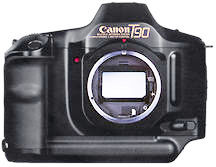
The Canon T-90 was the last model that uses FD-mount prior to the shift to the autofocus EF EOS system. It hardly lasted a year since its inception but what an impact it has created on the design of future SLR. Every inch a classic, despite after more than 15 years, this camera is still hard to replicate even by today's standard. It was also widely acclaimed as one of the true Classic camera of modern times. Here comes a common Message Board designed specifically for Canon T90 SLR model - this is especially useful when you realize ALL Canon FD mount SLRs have long been discontinued you may require a public forum for common support and sharing mutual knowledge or experience among many of you. This Site has proved to be quite popular and I am quite happy to see these effort was not wasted and special thanks to ALL the volunteered Site Maintainers of this Message Board. Enjoy.
This site is specifically created for this great SLR cameras by Canon. Please don't mail me other than constructive suggestions or rectifying mistakes found in this site, thanking you in advance. Since this is a non-profitable resource site - The developer of this site reserves the rights to censor or delete any inappropriate, unrelated, misleading or excessively hostile messages posted herein. If your intention is to dispose your Canon cameras or its accompanying accessories or looking for a used model or any of its system components, please use a separate section with a higher volume of traffic Free Trade Zone site instead. The Photography In Malaysia has no Guestbook on its own, because it is an integral part of the MIR site. But if you want to leave a note on your experience visiting this site, you may use the MIR's Guestbook at another new window by clicking on the Guestbook Link.
Post a Message to the Message Board
A
kind reminder: Please do
not misuse
of this message board system.
Back to Main Index Page of
Canon T-90 SLR Camera Website
1. From : Ken D (kdurling@earthlink.net)
Url : http://
Date : 07:23 AM Saturday 17 May, 2003
Dan - Oops! My bad - apologies. You do have to set the aperture on the ring to get an actual DOF preview. I think I confused it with my EOS camera. In this respect it is more like the A-1 than the EOS.2. From : Dan H (hitchcock_dan@hotmail.com)
Url : http://
Date : 10:50 PM Friday 16 May, 2003
Ken, thanks for your explanation. You mention that you can use the dof preview in any mode to preview what will be in focus. If I have the lens set to "A" and am using aperture priority then as I select different apertures using the finger wheel I don't see a difference through the viewfinder when I press the dof preview button i.e. the only time I can see what depth of field I'm going to get is if I move the lens off the "A" mark. Is this correct or is there a fault with my camera? Thanks Dan3. From : Ken D (kdurling@earthlink.net)
Url : http://
Date : 10:04 PM Friday 16 May, 2003
Dan - There's a difference between "stop down" mode, which is what you're describing, and "manual" mode, which is what happens with the lens off "A" - notice the "M" in the viewfinder and on the LCD - that means "manual." "Stop-down" is only strictly necessary with older lenses that do not have an auto aperture linkage, in order to get an accurate meter reading. If you simply set the aperture on the lens ring, and the shutter speed with the camera wheel you are in manual mode, and probably should be using an external light meter, or the "sunny 16" rule printed on some film boxes. The meter in the camera is still going to give you its recommendation - and will NOT reflect what you have set on the lens/camera. The least confusing way to shoot in manual mode is to set the camera on Tv and the lens off A. Incidentally, you can use the DOF preview button in ANY mode to preview your focus. It's one of the things I love about the T90 and my FTb. It's a PITA on the A-1.4. From : Terry Taylor (taylort111kph@yahoo.com)
Url : http://
Date : 07:26 PM Friday 16 May, 2003
Re: Blinking arrow on T90 main lcd. I have found that this indication is usually symptoms of a dirty mg2, mirror release magnet. This can be cleaned by any camera repair facility and usually gets done in a CLA. Give steven40@aol.com a shout or try www.mcvr.com, both of which have repaired T90's for me.
Incidently if your batteries are low the camera will typically be shooting in HS and shift to LS and show the blinking arrow indicating that it is time to change them. The camera will still function though. Hope this helps5. From : Dan H (hitchcock_dan@hotmail.com)
Url : http://
Date : 06:54 PM Friday 16 May, 2003
I'm a T90 newbie and have a question regarding aperture priority. As I understand it I can select aperture priority, put the aperture ring on the lens on "A" and then select the required aperture with the finger wheel (so far so good). Alternatively, I can put the lens into manual, select the aperture on the lens and lock in the depth of field button. This method has the advantage that you can see what's in focus. My question is this-will the camera still expose shots properly if I move the lens off the "A" position but forget to press in the depth of field button. When you do this no warning comes up but I don't know if the camera can "read" the aperture that you've dialled on the lens. Any answers appreciated!6. From : Mickey Oberman (mickeyobe@internet.look.ca)
Url : http://
Date : 11:45 AM Friday 16 May, 2003
p kollitsis, I had to get my T90 and take a look. There is no "Shutter Speed" button.
The only "button" on the front of the camera is the "Stop Down Lever". So I am puzzled. Could you please refer to your owners' manual and more accurately describe what you are pushing. Let's see if we can't get this problem buttoned down.7. From : p kollitsis (pkollitsis@doctors.org.uk)
Url : http://
Date : 12:48 AM Friday 16 May, 2003
Thanks to everyone for contribution of addvice.However the batteries have been changed several times and still the camera wont shoot sometimes(esp when you want to most!!).8. From : p kollitsis (pkollitsis@doctors.org.uk)
Url : http://
Date : 12:21 AM Friday 16 May, 2003
Does any technical expert know why when I press the shutter speed button to shoot a pic with my T90 nothing happens other than the shooting speed marked S(SINGLE FRAME)starts blinking. The only way to unjam this is by pressing the shutter release button in the front of the camera? Yours Philip9. From : TomR (tomrdale@aol.com)
Url : http://
Date : 12:00 AM Friday 16 May, 2003
Ehtasham, The blinking arrow does indicate low battry power. While the manual states that it should do this only when you've set the film advance to High Speed, I think I recall that my T-90 did this a while back when I had it set on Low or Single. (I can't remember which). Change the batteries and let us know what happens. Good luck, TomR.10. From : Larry (jjettllagg@hotmail.com)PAGE | 1 | 2 | 3 | 4 | 5 | 6 | 7 | 8 | 9 | 10 | 11 | 12 | 13 | 14 | 15 | 16 | 17 | 18 | 19 | 20 | 21 | 22 | 23 | 24 | 25 | 26 | 27 | 28 | 29 | 30 | 31 | 32 | 33 | 34 | 35 | 36 | 37 | 38 | 39 | 40 | 41 | 42 | 43 | 44 | 45 | 46 | 47 | 48 | 49 | 50 | 51 | 52 | 53 | 54 | 55 | 56 | 57 | 58 | 59 | 60 | 61 | 62 | 63 | 64 | 65 | 66 | 67 | 68 | 69 | 70 | 71 | 72 | 73 | 74 | 75 | 76 | 77 | 78 | 79 | 80 | 81 | 82 | 83 | 84 | 85 | 86 | 87 | 88 | 89 | 90 | 91 | 92 | 93 | 94 | 95 | 96 | 97 | 98 | 99 | 100 | 101 | 102 | 103 | 104 | 105 | 106 | 107 | 108 | 109 | 110 | 111 | 112 | 113 | 114 | 115 | 116 | 117 | 118 119 | 120 | 121 | 122 | 123 | 124 | 125 | 126 | 127 | 128 | 129 | 130 | 131 | 132 | 133 | 134 | 135 | 136 | 137 | 138 | 139 | 140 | 141 | 142 | 143 | 144 | 145 | 146 | 147 | 148 | 149 | 150 | 151 | 152 | 153 | 154 | 155 | 156 | 157 | 158 | 159 | 160 | 161 | 162 | 163 | 164 | 165 | 166 | 167 | 168 | 169 | 170 | 171 | 172 | 173 | 174 | 175 | 176 | 177 | 178 | 179 | 180 | 181 | 182 | 183 | 184 | 185 | 186 | 187 | 188 | 189 | 190 | 191 | 192 | 193 | 194 | 195 | 196 | 197 | 198 | 199 | 200 | 201 | 202 | 203 | 204 | 205 | 206 | 207 | 208 | 209 | 210 | 211 | 212 | 213
Url : http://
Date : 04:44 AM Thursday 15 May, 2003
Re: Shutter malfunction/film not advancing Just a guess here, but it sounds like you could have a battery problem. Have you checked your batteries to make sure they're fully charged, that they are all of the same type (the same brand), that the connections are clean, etc. Please check this out and see if it helps.
| Post a Message to the Message Board |
Archived Messages of Previous Postings
001-050 | 051-100 | 101-150 | 151-200 | 201-250 | 251-300 | 301-350 | 351-400 | 401-450 | 451-500 | 501-550 | 551-600 | 601-650 | 651-700 | 701-750 | 751-800 | 801-850 | 851-900 | 901-950 | 951-1000 | 1001-1050 | 1051-1100 | 1101-1150 | 1151-1200 | 1251-1250 | 1251-1300Maintainers for Canon T-90 Message Board:
Terry Carraway (TCarraway@compuserve.com), Mickey Oberman (mickeyobe@rogers.com); Kaipin (kaipinc@tm.net.my), Tom Rigilano (trigilano@yahoo.com) & Irwin (Dr Strangeluv)Back to Main Index Page of
Canon T-90 SLR Camera WebsiteBack to Message Board of Canon T-90 SLR Camera(s)
Disposing/Looking
for New/Used photographic equipment
on Canon T-90 camera
Administrator Page

Home - Photography in Malaysia
Copyright © 2007. leofoo ®. MIR Web Development Team.
Version three Re-Programmed by our in-house Fairuz Sulaiman, improved from original version by Ang Seng Leong ,Yeak Ngai Siew, Rizal Yahya, Halimaton Yahya (Members of the MIR Web Development Team)MIR Guestbook On-line. Developed & Copyright@ 2001 by MIR Communications Sdn. Bhd.